Why Git Tower...
...and not Atlassian's SourceTree, seeing it's free and all? That's a question I keep getting asked every now and then. From now on, I can point people who ask me to this article.
A bit of history for context: I'm an Apple user. On my Apple computers, I run virtual machines (VMware) with Windows for the various LabVIEW versions I need. Up until Windows 7, I used to have my repositories cloned in MacOS to a shared folder, and then work with these "shared files" inside the Windows VMs. With Windows10, though, using files from a shared folder started to become really slow, so I had to move the repos inside my VMs. Today, I'm using git mostly on Windows, less often on MacOS.
I used to use various UI-enabled git clients on my Mac but never enjoyed using them. For some, you could tell from the UI that they were not native Mac OS applications, written in some cross-platform language like Java. Others were native to Mac OS, but didn't really live up to the high standards of Mac OS application design.
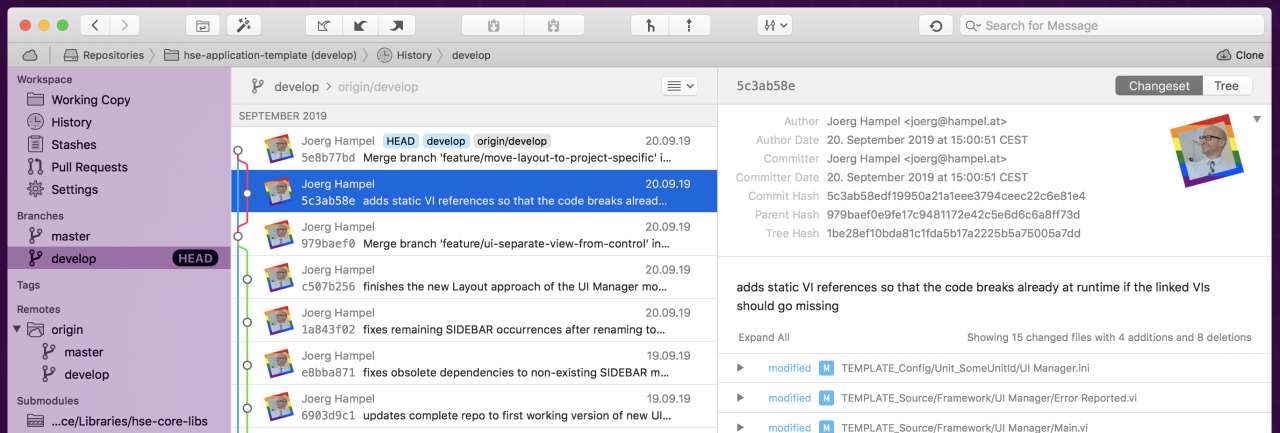
When I first stumbled upon Git Tower somewhere in 2014(?), I immediately jumped on it as it has been a beautiful, native Mac app from the very beginning. The UX was and is so nice! In 2017, I started using git much more on Windows, and luckily, the Git Tower app was also released for Windows soon after.
As of today, Atlassian's SourceTree seems to be the popular choice. A big plus is that it's available for free. I still prefer to pay for Git Tower. That is probably due to me being used to it for quite some time now, but I find that little details are much better implemented in Tower. Examples are:
- When creating a new feature branch with Gitflow, Tower automatically stages and applies modifications from my workspace (and that happens all the time: I start hacking away, I want to commit, I realise I forgot to create the feature branch)
- Prettier UI (this one is purely subjective)
- The way the number of commits your local branch is behind or ahead of the origin branch is presented, both in the sidebar and in the visual history
- The way the currently selected branch in the sidebar is represented in the history visualisation
- The way submodules are visually represented in Tower is more straightforward for me
- The online help/documentation is awesome
- And finally, the graphical presentation of merge conflicts!
Edit (2019-09-31): I had listed "Full support for GitLab (I can browse my GitLab repos in Tower and clone them with one mouse click)", but Olivier pointed out that SourceTree now also supports browsing GitLab. Great, that makes it so much easier for our whole teams!
The Git Tower website holds more information on the comparison between Tower and SourceTree.
The support team of Fournova (the company behind Git Tower, located perhaps one hour south of my place in Germany) is super fast to reply, very helpful and competent. When they released the Windows version, there very quite a few kinks that had to be ironed out. The guys there were always thankful for the feedback, and more than once they would build a new release right ahead to address things we found out together.
Reading back this comparison, it feels a bit like comparing Mac to Windows. I can get everything and anything done on both operating systems. My personal choice is Apple, no questions asked. And it's the same with Git Tower: I find the overall UX much nicer, I think it's worth the money, hence I'll keep using it.
As always, I'm interested in other people's opinions. Did I miss anything, or get anything wrong? Please let me know in the comments.
Hello Joerg, have you been able to create a JSON file (as described here : https://www.git-tower.com/help/win/integration/custom-diff-tools) to integrate LVDiff and LVMerge into Git Tower?
I like your article Joerg, thanks. As a much recent Git user than you, I'm still looking for the right tool. I'm currently using SourceTree. As you say it’s a free app and it is one of its advantages. Not because it cost nothing but because in a VM environment it's way easier to manage than any "protected" software. My question here is how do you manage more than one activation ? Another question, which plan did you purchase ? That being said I agree that Sourcetree is sometimes painful to use (I'm still struggling when it comes to dealing with conflict and documentation is really poor). Last comment related to Gitlab, support is now correctly managed by SourceTree. You connect browse and clone projects easily directly from SourceTree. Thanks again for your article.