A quick introduction to generating Synthetic Data with Python and Faker
Extra thanks to Jerome Weathers for his suggestion to use the CodeSnap extension in VS Code to produce the images used in this article.
You’re trying to practice your SQL query skills; you’ve just finished setting up your SQL Server but don’t have any data in your database to query!
Now, we can sit here and SELECT NULL FROM NULL WHERE NULL BETWEEN NULL AND NULL till the data comes home, or we can actually put some data in there.
So you create your table and columns:
And you get to typing:
Well, this is going to take some time… you want at least 100 rows of data before you feel ready to begin querying but that’s going to take hours and you only have enough time to make 10 rows at most...
Who's ever heard of a table with only 10 rows of data? No one has. because people with only ten rows of data are quickly run out of town. And rightly so.
The stress is too much. You have no choice but to leave country. You’ll need to adopt a whole new identity!
Luckily you know an easy way to generate hundreds of fake identities at the push of a button.
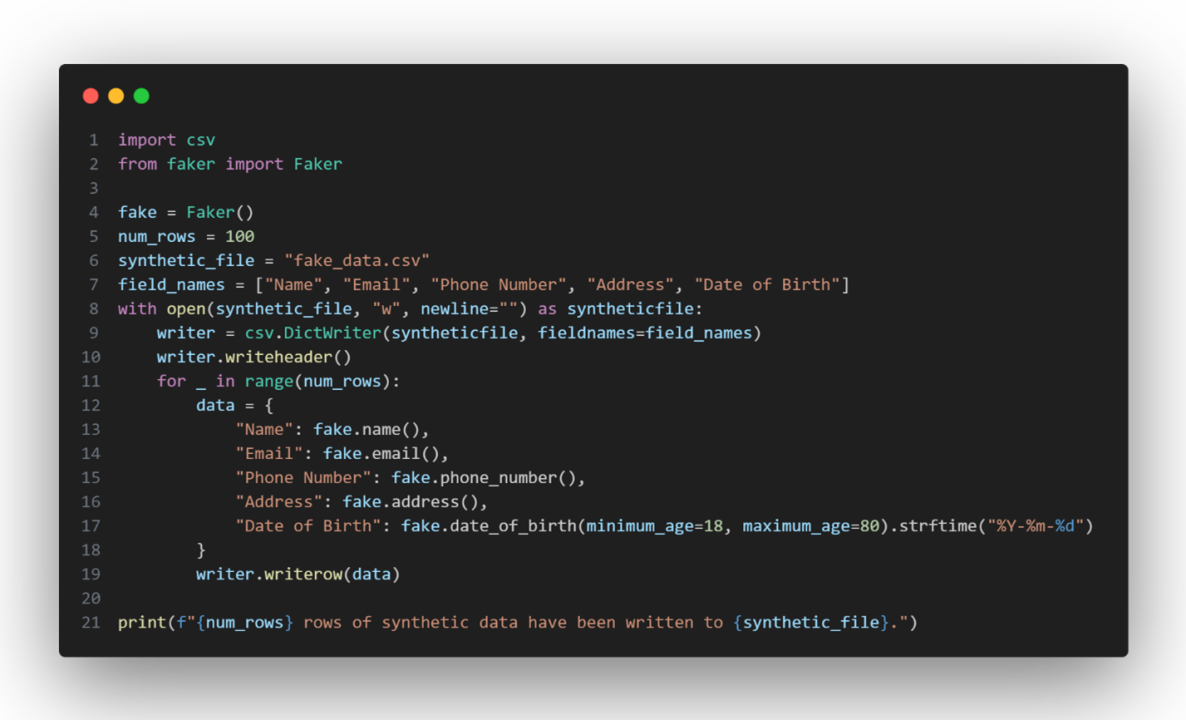
You prepare for your escape by breaking out the script you’ve been keeping in your emergency pocket protector for just this moment:
Using Faker to generate data and csv to write it to a file, you can easily generate 100 fake identities or more in mere seconds! As many as your little heart desires simply by changing the value on line 5.
Now you can provide this .csv file to your favorite document forger to upload to their favorite database and query you a new identity every month! Which is about how often you write code too shameful to share.
Leaving the country has never been easier.
Recommended by LinkedIn
Now you will never have to suffer the crushing humiliation of being the only person this side of the Mississippi with less than 10 records in their database.