Mastering the Logging Lifecycle in Google Cloud Platform: A Comprehensive Guide to Best Practices
Introduction
The Concept of Logging in Cloud Platforms
Logging is an essential aspect of cloud computing that involves the collection and storage of data about specific operations within a system. In cloud platforms like Google Cloud Platform (GCP), logging is not just a way to keep track of events; it's a crucial component for monitoring, troubleshooting, and securing applications and infrastructure. In Google Cloud Platform, logs are generated to capture various aspects of your cloud environment, providing insights into its operational status and behavior.
The Importance of Understanding the Lifecycle of Logs in GCP
Understanding the lifecycle of logs in GCP is vital for several reasons. It helps organizations to comply with data governance policies, enhances security measures, and aids in efficient troubleshooting. Furthermore, a well-managed logging lifecycle can provide valuable insights into user behavior and system performance.
What This Blog Will Cover
This blog is designed to provide an in-depth look at the various stages of the logging lifecycle within Google Cloud Platform (GCP). I'll be examining each phase and offering insights into best practices.
The Importance of Logging
Why Logging is Crucial for Businesses ?
Logging is not just a technical requirement but a business imperative. A well-implemented logging strategy can offer a competitive edge by providing insights into application performance, user behavior, and operational efficiencies. It serves as the backbone for any robust security and compliance posture, helping organizations to quickly identify and respond to security incidents.
Various Use-Cases: Security, Compliance, Troubleshooting, and Business Intelligence
The Four-Stage Lifecycle of Logs in GCP
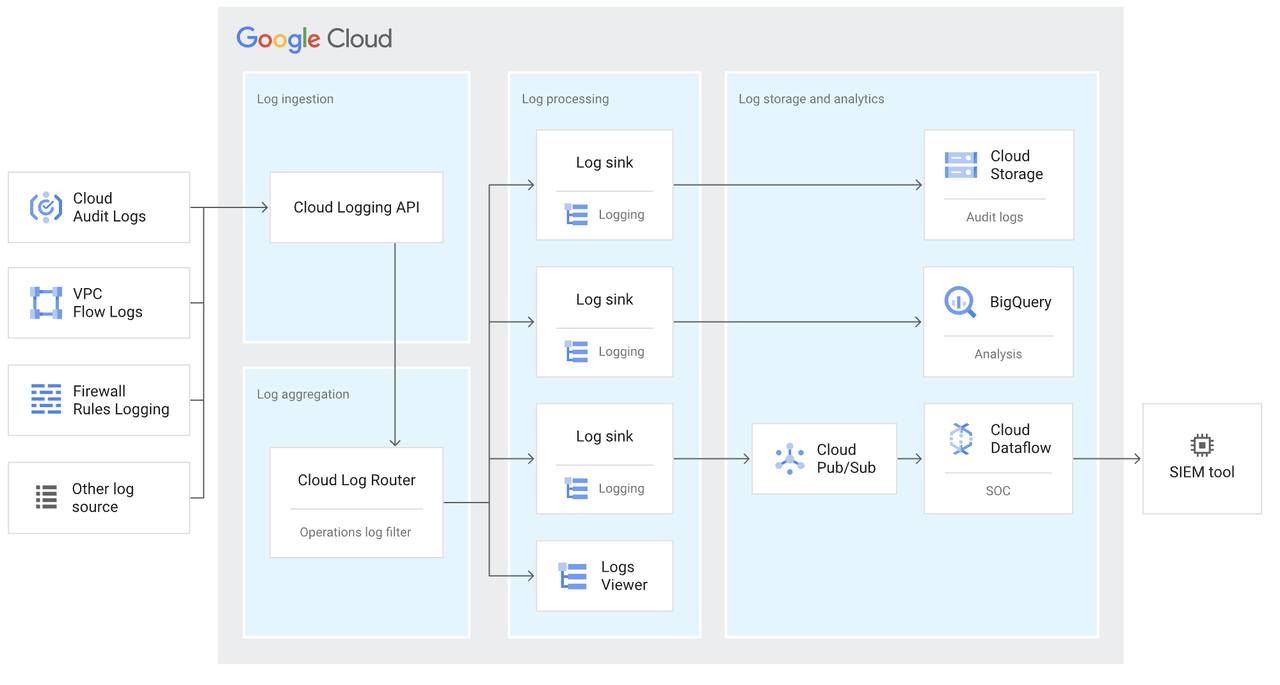
Log creation occurs when different elements of a system, whether they are hardware, software, or cloud-based services, produce log entries to document various events, actions, or noteworthy occurrences. These entries can take the form of system logs, application logs, audit logs, or other specialized logs that offer insights into the system's operational status or activities. Following log creation, the next phase is log aggregation, where these produced logs are collected and centralized for future scrutiny, tracking, and archiving. In the context of Google Cloud Platform, there are several key concepts to explore.
Structured logs are logs that follow a consistent format or structure, often in the form of key-value pairs or JSON objects. Unlike unstructured logs, which are just plain text, structured logs are easier to analyze and query. They allow for more efficient storage and quicker retrieval, making them highly beneficial for both real-time and historical analysis.
Unstructured Log
2023-10-09 12:34:56 ERROR User login failed due to incorrect password.
Structured Log
{
  "timestamp": "2023-10-09T12:34:56Z",
  "severity": "ERROR",
  "message": "User login failed",
  "details": {
    "reason": "incorrect password",
    "username": "john.doe"
  }
}
Severity levels in logging help categorize log entries based on their importance. Levels like DEBUG, INFO, WARNING, ERROR, and CRITICAL allow engineers to filter logs and focus on the most crucial events. This categorization aids in quicker troubleshooting and more effective monitoring.
Data access audit logs record events when data is read or modified, providing an extra layer of security and compliance. VPC (Virtual Private Cloud) flow logs capture information about the IP traffic going to and from network interfaces in a VPC, aiding in network monitoring and forensics.
Log processing is the phase in which gathered logs undergo parsing, filtering, and enrichment to enhance their utility for both analysis and real-time monitoring. Activities in this stage include breaking down logs into structured formats, eliminating irrelevant entries, and augmenting logs with additional data or context. Following this, log routing comes into play, where these refined logs are channeled to different endpoints according to set rules or criteria. These endpoints could range from log buckets for extended storage, to monitoring solutions for immediate analysis, or even third-party services for specialized tasks. In the context of Google Cloud Platform, there are several key concepts to explore.
A regional endpoint allows you to specify a geographical location where your logs will be received and stored. This is particularly important for complying with data residency requirements and optimizing latency.
An aggregated log sink collects logs from multiple sources, such as different GCP projects or services, into a single destination. This centralization simplifies log management and enhances security by providing a unified view of all logs.
Recommended by LinkedIn
Automating the setup of log sinks and buckets ensures that new projects or services are immediately compliant with organizational logging policies. Automation also reduces human error and streamlines the logging process.
3. Log Storage & Retention
Log storage in Google Cloud Platform entails the secure and long-lasting archiving of logs in a unified repository for purposes such as future analysis, compliance, and reference. GCP's Cloud Logging service provides dedicated storage options called "log buckets," which can house logs from a variety of GCP services as well as custom applications. These buckets can be configured to be either regional or multi-regional, facilitating compliance with data location regulations. Log retention, on the other hand, is the regulated handling of these stored logs, specifying the duration for which they should be preserved before automatic deletion or archiving occurs.
Custom log buckets allow organizations to specify where their logs will be stored, offering greater control over data residency and access permissions.
Organization policies can be set to enforce where log buckets are created, ensuring compliance with data residency laws and internal regulations.
Retention policies dictate how long logs are kept before being deleted. Log bucket locking is an irreversible action that prevents logs from being modified or deleted, providing an extra layer of security and compliance.
In GCP, log analysis is the process of scrutinizing and making sense of saved logs to derive valuable information about system operations, security measures, and user activities. Tools like Cloud Monitoring and BigQuery are available within Google Cloud to facilitate this. On the other hand, access management in GCP is focused on governing who has the authorization to view and interact with your log data. This is vital for upholding the logs' security and overall integrity. GCP adheres to the "least privilege" principle, ensuring that individuals are granted only the most minimal access levels required to complete their tasks.
The principle of least privilege advocates for providing only the permissions necessary to perform a task. This minimizes the risk of unauthorized access or accidental modifications.
Applying the principle of least privilege in log analysis means granting users and systems only the access levels they need to perform their roles. This enhances security and ensures that sensitive log data is only accessible to authorized personnel.
Best Practices for Each Stage of the Lifecycle
Log Generation & Collection
Log Processing & Routing
Log Storage & Retention
Log Analysis & Access Management
Implementing a well-planned logging lifecycle in GCP not only enhances security and compliance but also provides valuable insights into system performance and user behavior. It's an indispensable tool for any organization looking to optimize their cloud operations.
Additional Resources


