Learning Unity's Scriptable Objects for Efficient Game Data Management
There are many different reasons to create custom windows in the Unity Editor, and many different factors to consider when approaching using scriptable objects to streamline work.
For example, if your game has thousands upon thousands of assets, (think different items that drop in Diablo/Borderlands) then you might want a way to make the creation of those assets (and the values that they hold) easier to manage and to create in the first place.
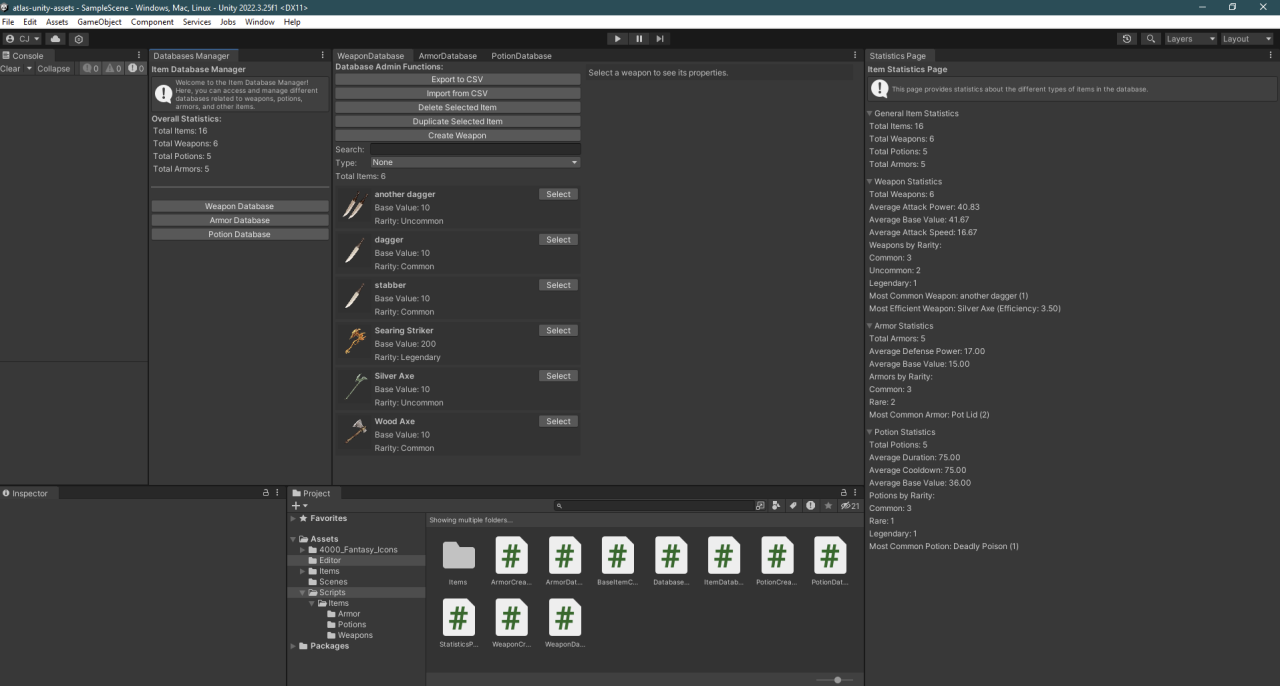
We made one such Database Manager during our last sprint. This Database Manager creates a window from which you can create a window to the Weapon, Armor, or Potion Databases. Inside of those databases we can see a list of all created objects in that database, a search bar to find specifically named objects, and a type dropdown where you can filter objects by type. In addition, there are options to import objects from .csv format, to export objects to .csv format, if an item is selected then the user can delete the object, duplicate the object, or create a new one.
Here’s how we did it:
First of all, what are ScriptableObjects?
Using ScriptableObjects in Unity is a great way to store and serialize shared data by creating Base instances of classes that other subclasses can inherit from, thus allowing us to make broad changes across all items as needed. These are different from GameObjects in Unity because of the fact that GameObjects only exist in Scenes or Prefabs, where ScriptableObjects exist in storage (on the disk).
In addition, GameObjects extend via MonoBehaviour, which gives that GameObject access to certain variables, methods, and messages; whereas ScriptableObject tells Unity that the script will create an object that contains data. A ScriptableObject script cannot be attached to an object either.
Implementing the Weapon Database Manager
Our goal was to create a comprehensive and user-friendly database manager for game items. Here’s a step-by-step breakdown of how we achieved this:
1. Creating the Base Classes
We started by defining base classes for our items. Each item type (Weapon, Armor, Potion) extends from a common base class that holds shared properties such as name, icon, description, and rarity. Specific properties, such as attack power for weapons or defense for armor, are added in the derived classes.
2. Custom Editor Window
We developed a custom editor window to manage these items. This window provides an interface to view, create, edit, and delete items in the database. It includes:
Recommended by LinkedIn
3. Real-Time Filtering and Search
We implemented real-time filtering and search functionality. As the user types in the search bar or selects a type from the dropdown, the list of items updates instantly. This is achieved by querying the database and applying the filters in real-time.
4. CSV Import and Export
One of the key features is the ability to import and export items from/to CSV files. This allows for easy data management and bulk editing of items. We used the StreamWriter and StreamReader classes to handle CSV operations. Each item’s properties are written to or read from the CSV file, ensuring that data is correctly serialized and deserialized.
5. Item Management
The custom editor window also provides buttons to delete, duplicate, and create new items. When an item is selected, its properties are displayed in a dedicated section where they can be edited. Changes are saved and immediately reflected in the database.
Benefits of Using ScriptableObjects
Conclusion
Implementing a custom database manager using ScriptableObjects and custom editor windows significantly enhances the development workflow. It allows developers to manage game assets efficiently, ensuring that data is easy to create, edit, and maintain. By leveraging Unity's powerful editor scripting capabilities, we can build robust tools that streamline game development processes and boost productivity. If you’re looking to streamline your asset management process, consider adopting a similar approach in your projects.
In addition, if you’re interested in checking out my implementation of this solution, feel free to check out my Github at:
Sources