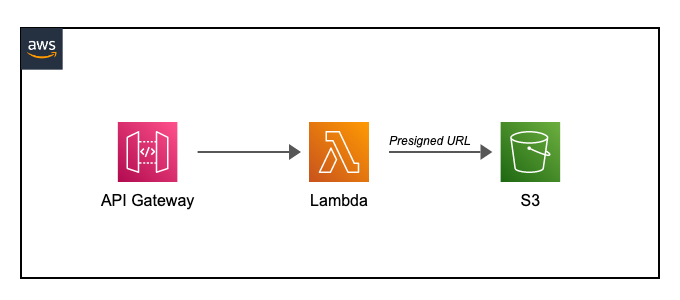
Integrating AWS Lambda with S3, API Gateway, and Retrieving Function Events
Title: Integrating AWS Lambda with S3, API Gateway, and Retrieving Function Events
In this Article, I'll guide you through the process of integrating AWS Lambda with services like Amazon S3, connecting it to API Gateway, and retrieving Lambda function events using API Gateway. Let's dive in!
Step 1: Create an AWS Lambda Function
1. Open the AWS Management Console and navigate to the Lambda service.
2. Click on "Create function" and provide a name, runtime, and execution role for your Lambda function.
3. Write the code for your Lambda function that will process the S3 event.
Step 2: Integrate Lambda with Amazon S3
1. In the Lambda function configuration, click on "Add trigger" and select "S3" from the available triggers.
2. Choose the specific S3 bucket and event type (e.g., object created, deleted) that should trigger the Lambda function.
3. Configure any additional settings as needed and save the trigger.
Step 3: Create an API Gateway
1. Open the AWS Management Console and navigate to the API Gateway service.
Recommended by LinkedIn
2. Click on "Create API" and select the type of API you want to create (REST or WebSocket).
3. Set up the API Gateway resources and methods according to your requirements.
Step 4: Integrate Lambda with API Gateway
1. In the API Gateway console, select the resource and method you want to connect with Lambda.
2. Under the "Integration type" dropdown, choose "Lambda function" and select the region where your Lambda function is deployed.
3. Choose the Lambda function you created earlier and save the integration.
Step 5: Deploy the API Gateway
1. In the API Gateway console, click on "Actions" and choose "Deploy API".
2. Select the deployment stage (e.g., "prod") and save the deployment.
Step 6: Retrieve the Lambda Function Event using API Gateway
1. In the API Gateway console, select the resource and method you integrated with Lambda.
2. Under the "Method Execution" section, click on "Test".
3. Configure the test event payload if required and click on "Test" to trigger the Lambda function through API Gateway.
By following these steps, you can seamlessly integrate AWS Lambda with Amazon S3, connect it to API Gateway, and retrieve Lambda function events using API Gateway. Remember to customize the configurations and code according to your specific use case.
Happy coding! If you have any questions or need further assistance, feel free to reach out. 🚀
What are the AWS supported languages