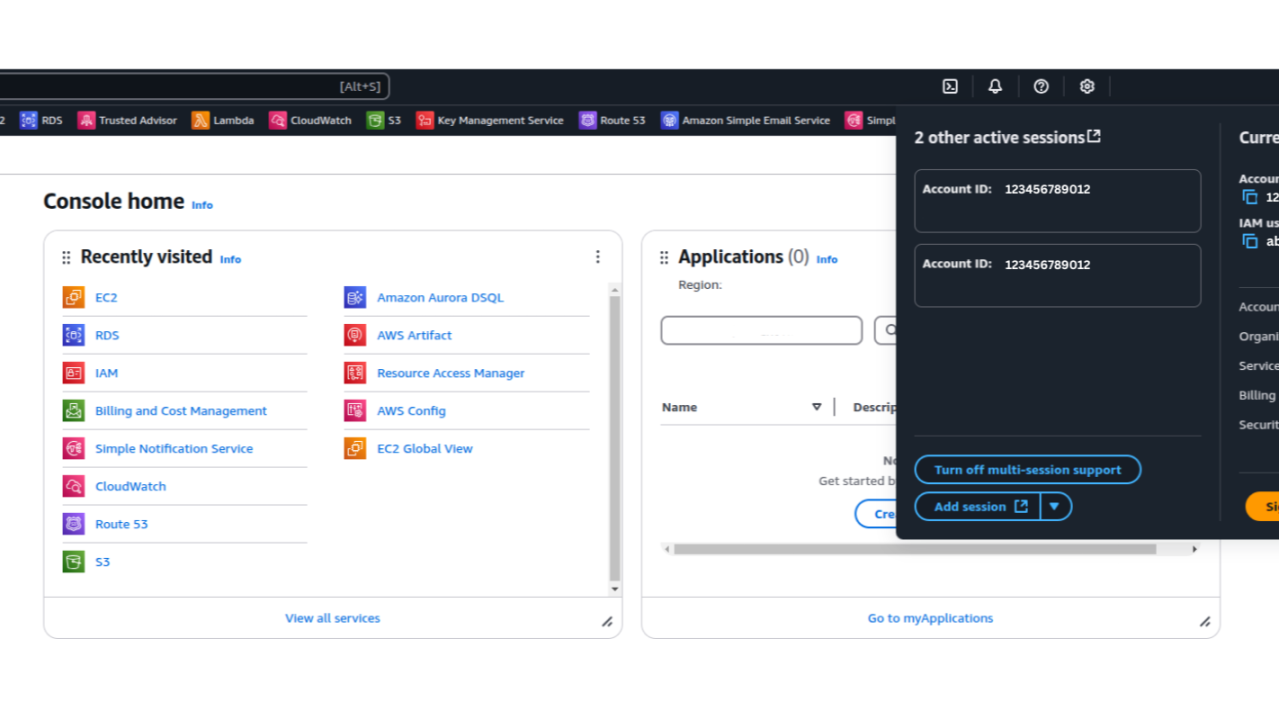
How to Enable Multi-Session Support in the AWS Console💻
You might have spotted the option to enable it in the top-right corner of the AWS Management Console when you're logged in.
𝗠𝘂𝗹𝘁𝗶-𝗦𝗲𝘀𝘀𝗶𝗼𝗻 𝗔𝗪𝗦 𝗖𝗼𝗻𝘀𝗼𝗹𝗲
AWS has rolled out multi-session support in the AWS Management Console, allowing users to log in to up to 5 accounts simultaneouslybe it root, IAM, or federated roles across different accounts or even within the same account.
Gone are the days of logging out and back in repeatedly. With this feature, you can seamlessly switch between dev, staging, and production accounts or roles, all in one browser!
𝗛𝗼𝘄 𝗜𝘁 𝗪𝗼𝗿𝗸𝘀
1. Enable Multi-Session: Click your account name in the AWS Console, then select “Turn on multi-session support.”
2. Add a New Session: Choose “Add session” and sign in to a new AWS account or role in a fresh tab.
3. Isolated Tabs: Each session opens in its own tab with a unique subdomain, such as:
𝗜𝗺𝗽𝗼𝗿𝘁𝗮𝗻𝘁 𝗡𝗼𝘁𝗲𝘀 :
• Supports up to 5 concurrent sessions.
• Browser-specific – needs to be enabled per browser.
• Update bookmarks to reflect unique session URLs.
Recommended by LinkedIn
𝗦𝗲𝗰𝘂𝗿𝗶𝘁𝘆 𝗖𝗼𝗻𝘀𝗶𝗱𝗲𝗿𝗮𝘁𝗶𝗼𝗻𝘀
While this feature is a massive productivity boost, there's a 𝘀𝗲𝗰𝘂𝗿𝗶𝘁𝘆 𝗰𝗼𝗻𝗰𝗲𝗿𝗻 worth noting: 𝗔𝗪𝗦 𝗔𝗰𝗰𝗼𝘂𝗻𝘁 𝗜𝗗𝘀 𝗶𝗻 𝗦𝘂𝗯𝗱𝗼𝗺𝗮𝗶𝗻𝘀
• Once multi-session support is enabled, the account ID becomes part of the console URL.
• Even if you use an account alias, the account ID remains visible in the subdomain.
• Some argue that account IDs should be private, while others see them as mere identifiers.
Regardless of where you stand in this debate, AWS account IDs appearing in URLs could potentially expose identifiers that might aid attackers in targeted phishing attempts or enumeration tactics.
𝗪𝗵𝘆 𝗧𝗵𝗶𝘀 𝗙𝗲𝗮𝘁𝘂𝗿𝗲 𝗶𝘀 𝗮 𝗚𝗮𝗺𝗲-𝗖𝗵𝗮𝗻𝗴𝗲𝗿
• 𝗦𝗲𝗰𝘂𝗿𝗶𝘁𝘆 𝗜𝗻𝘃𝗲𝘀𝘁𝗶𝗴𝗮𝘁𝗶𝗼𝗻𝘀: Quickly switch between accounts to analyze events.
• 𝗦𝘂𝗽𝗽𝗼𝗿𝘁 𝗧𝗲𝗮𝗺𝘀: Troubleshoot issues across multiple environments.
• 𝗗𝗲𝘃𝗢𝗽𝘀 𝗘𝗻𝗴𝗶𝗻𝗲𝗲𝗿𝘀: Compare configurations between dev, staging, and prod.
• 𝗖𝗹𝗼𝘂𝗱 𝗔𝗿𝗰𝗵𝗶𝘁𝗲𝗰𝘁𝘀: Easily manage multi-account setups.
This feature is currently available in all 𝗖𝗼𝗺𝗺𝗲𝗿𝗰𝗶𝗮𝗹 𝗔𝗪𝗦 𝗥𝗲𝗴𝗶𝗼𝗻𝘀 and needs to be enabled per browser.
#CloudSecurity #AWSCommunity #AWSSecurity #DevOps #CloudComputing #CloudManagement #SecurityBestPractices #AWSUpdates #DevSecOps #aws #productivity #cloud
🤝