Deploying a high-availability RabbitMQ cluster with Helm & Operator 🚀: A Scalable, Cost-Effective Open-Source Solution for message brokering in K8s
In modern enterprise applications, message brokers like RabbitMQ play a critical role in enabling asynchronous communication, event-driven architectures, and micro-services scalability.
However, a single-node RabbitMQ deployment isn't enough for enterprise workloads. That’s why businesses deploy RabbitMQ in clustered mode, ensuring:
✔ High Availability & Fault Tolerance – Ensures message delivery even if individual nodes fail.
✔ Scalability – Handles high-throughput workloads.
✔ Load Balancing – Efficient message distribution prevents bottlenecks.
✔ Persistent Messaging – Messages are never lost, even during failures.
Most existing solutions, such as Bitnami's RabbitMQ Helm chart, allow deploying RabbitMQ without using the RabbitMQ Operator. While that works for basic deployments, enterprise-grade RabbitMQ clusters require robust lifecycle management—which is where the RabbitMQ Operator comes in.
Since there’s no official Helm chart for deploying RabbitMQ under operator control, I decided to build a custom Helm chart to bridge this gap.
In one of my recent AI-driven projects, the application required a highly available and scalable RabbitMQ solution. While managed RabbitMQ services were available, the cost of leveraging such services was a key consideration. After evaluating the requirements and long-term sustainability, I opted for an open-source RabbitMQ solution, which provided the necessary features without the high operational costs associated with managed services.
By deploying RabbitMQ using the RabbitMQ Operator and a custom Helm chart, I ensured full lifecycle management, high availability, and seamless scalability—offering a robust message brokering solution at a fraction of the cost of managed alternatives.
Considering the project's demands for flexibility and cost-effectiveness, I proposed and implemented an open-source RabbitMQ-based messaging architecture. This open-source approach not only aligned with the project’s goals but also showcased how open-source solutions could seamlessly integrate into modern enterprise environments.
By combining the RabbitMQ Operator with a custom-built Helm chart, I ensured:
✔ Open-source RabbitMQ deployment with full lifecycle management.
✔ High availability and fault tolerance for handling real-time data streams.
✔ Modern cloud-native practices, leveraging Kubernetes-native operators for scaling and upgrades.
Deployment Workflow 🏗️
✅ Step 1: Deploy the RabbitMQ Operator first – This ensures that once the RabbitMQ cluster is deployed, the operator can handle its scaling, upgrades, and recovery.
✅ Step 2: Use my custom Helm chart to deploy the RabbitMQ Cluster, which is then fully managed by the RabbitMQ Operator.
Key Features of My Helm Chart
✔️ RabbitMQ Cluster Managed by Operator – Lifecycle management is automated.
✔️ High Availability (HA) – Deployed with three RabbitMQ instances for redundancy.
✔️ Pod & Node Affinity – Ensured even distribution of pods across Kubernetes nodes.
✔️ StatefulSet Overrides – Used podManagementPolicy to control pod startup behavior.
✔️ Pod Disruption Budget (PDB) – Ensured RabbitMQ stays available during Kubernetes node updates.
✔️ Ingress Configuration – Enabled secure external access.
Generic Challenges
🚧 Helm Uninstall Not Cleaning Up Resources: Since the RabbitMQ cluster is managed by the operator, CRDs and finalizers prevented full cleanup. Solution? Delete the RabbitmqCluster resource first, then uninstall Helm.
🚧 StatefulSet Management: Fine-tuned pod spin-up behaviour by overriding podManagementPolicy.
🚧 Helm Templating Flexibility: Used toYaml for better templating and dynamic configurations.
Code Snippet 🚀
Here’s how I deployed the RabbitMQ Operator & RabbitMQ Cluster using Helm:
# Step 1: Deploy the RabbitMQ Operator (ensures lifecycle management)
kubectl apply -f https://github.com/rabbitmq/cluster-operator/releases/latest/download/cluster-operator.yml
# Step 2: Deploy RabbitMQ Cluster using my Helm Chart
helm upgrade --install my-rabbitmq-release ./rabbitmq-helm-final --namespace rabbitmq-test -f values.yaml Enhanced Snippet from values.yaml
This YAML configuration includes:
RabbitMQ Configuration for optimized cluster behaviour.
override:
statefulSet:
Recommended by LinkedIn
spec:
podManagementPolicy: "OrderedReady"
updateStrategy:
type: RollingUpdate
affinity:
nodeAffinity:
requiredDuringSchedulingIgnoredDuringExecution:
nodeSelectorTerms:
- matchExpressions:
- key: "kubernetes.io/arch"
operator: "In"
values:
- "amd64"
podAntiAffinity:
requiredDuringSchedulingIgnoredDuringExecution:
- labelSelector:
matchExpressions:
- key: "app.kubernetes.io/name"
operator: "In"
values:
- "rabbitmq-cluster"
topologyKey: "kubernetes.io/hostname"
podDisruptionBudget:
enabled: true
spec:
minAvailable: 2
rabbitmq:
additionalConfig: |
cluster_formation.peer_discovery_backend = rabbit_peer_discovery_k8s
cluster_partition_handling = autoheal
queue_master_locator = min-masters
log.console.level = info
disk_free_limit.relative = 1.0
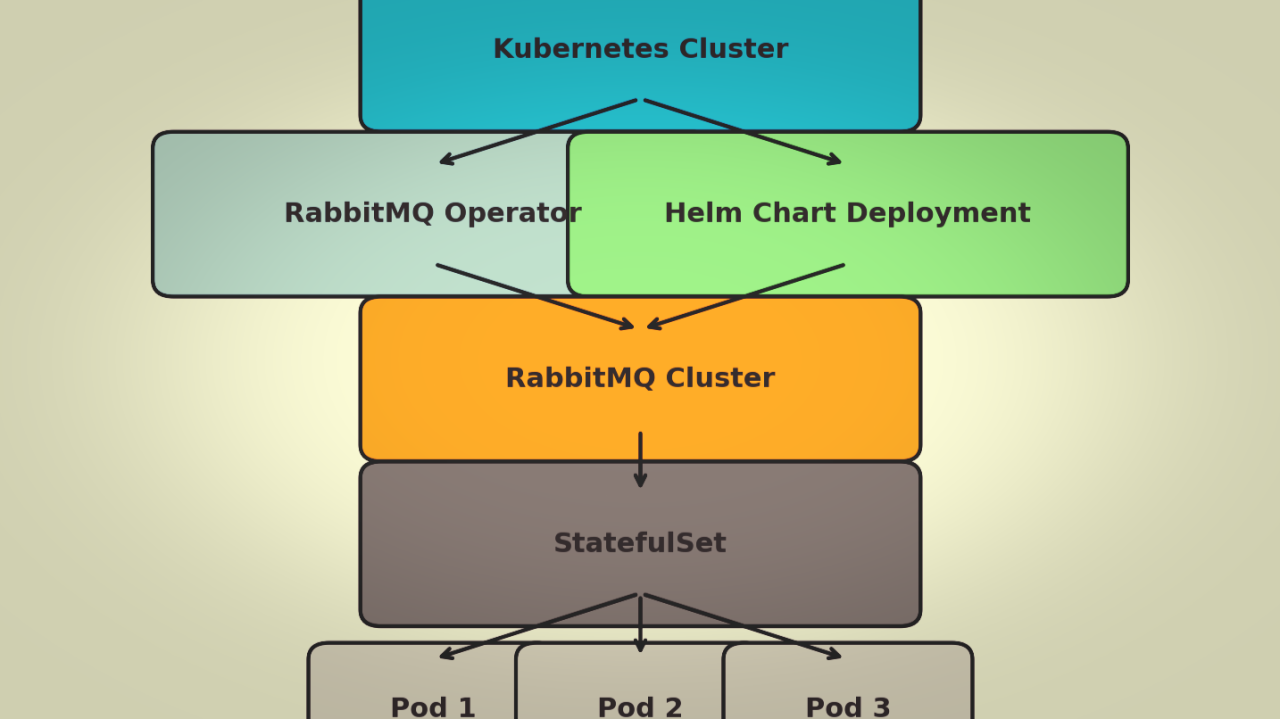
Architecture Diagram 🖼️
Below is a high-level architecture diagram illustrating how the RabbitMQ Operator manages the RabbitMQ Cluster, which is deployed via Helm.
🔹 Step 1: Deploy RabbitMQ Operator
🔹 Step 2: Deploy RabbitMQ Cluster via Helm
🔹 Step 3: The RabbitMQ Operator manages scaling, upgrades, and failovers
💡 Would you be interested in an open-source version of this Helm chart?
💬 How are you deploying RabbitMQ in Kubernetes?
🚀 Let’s discuss best practices for managing stateful applications in cloud-native environments!
Standard Disclaimer: Views expressed here are solely mine and may not directly or indirectly refer Kyndryl position. This is for pure educational purposes only. Kyndryl does not endorse or approve, and assumes no responsibility for, the content, accuracy or completeness of the information presented. The Information is general information only and is not, and is not intended as, professional, or legal advice to a user.
Ravi kumar very nicely articulated