Day 4 Task: Basic Linux Shell Scripting for DevOps Engineers

Day 4 Task: Basic Linux Shell Scripting for DevOps Engineers

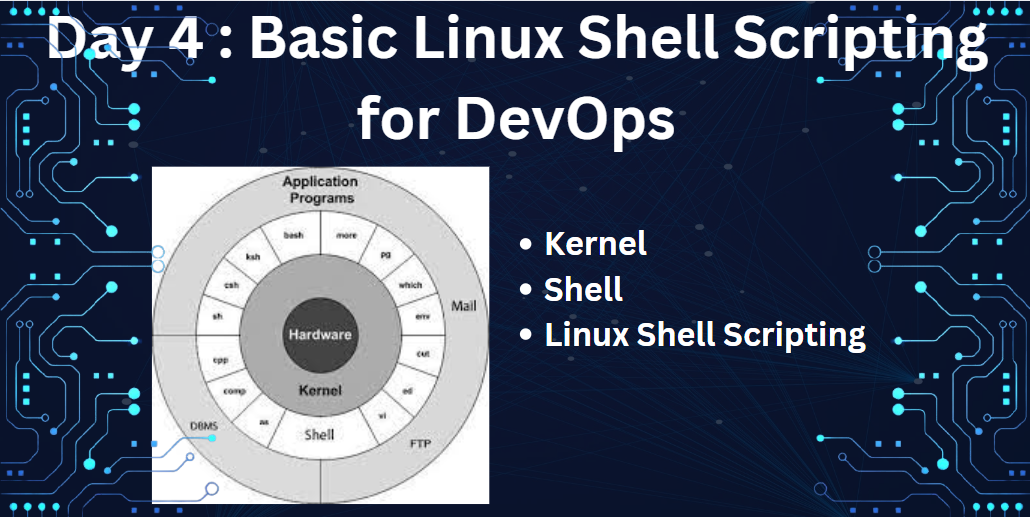
As a part of my learning of Day 4. I am learning some basic and important part of linux operating system. Linux is multi user and multi tasking operating system. But how it is work? It has two main component Kernel and Shell. The Kernel interact with the machine's hardware, and Shell interact with the users.

What is Kernel?

The Kernel is the core of operating system, a collection of code written in C. It is loaded into memory when system is booted and communicate directly with the hardware. Apart from providing support to user program the Kernel has a great deal of housekeeping to do. It manage the system memory, schedule process, decide their priorities and preform other tasks which you wouldn't like to bother about. It is often called as operating system.

What is Shell?

A compute does not have any inherent capability of translating the commands into action. That requires command interpreter, a job that is handled by outer part of operating system is called as Shell. It is actually the interface between users and the Kernel. Even though there are only one Kernel running on the system, there could be several shell in action one for each user who logged in. There are various types of shell available but below are few well know,

  • sh : Bourne Shell the oldest shell of all
  • ksh : Korn shell developed by David Korn
  • csh : c like shell developed by Dennis Ritchie
  • bash : Bourne Again Shell Default shell in linux os, most user friendly shell.

What is Linux Shell Scripting?

User executes command on Shell, and Shell translate the commands into instruction send to Kernel and Kernel perform the actions. Shell has capability to execute multiple commands from a file. If file with multiple command executes one by one is called as script. Script is a similar to program or code in other programming language. So script which can be executed by Shell is called Shell script.

Tasks:

  • Explain in your own words and with examples what Shell Scripting means for DevOps. Shell Scripting is very important part of Devops Engineer. There are lots of task that Devops engineer needs to do in day to day life. It is not good practice to run and executes all these task manually everyday. So we can create shell script for all this repetitive task and schedule or automate it. For example, Everyday server/application stats, Memory/CPU utilization of servers, log backups on daily basis. These are some basic task, there are lot more.
  • What is #!/bin/bash? Can we write #!/bin/sh as well? #!/bin/bash - a special line at the beginning of a script that tells the operating system which Shell to use when executing the script. This line, also known as a Hashbang or Shebang , is the first line of a dash and starts with "#!" followed by the path to the Shell. #!/bin/bash this tell Kernel that while executing script bash Shell need to use. We can use any of the shell as per requirement. We can use #!/bin/sh also it represent sh Shell to use.
  • Write a Shell Script that prints "I will complete #90DaysOfDevOps challenge" PFB screenshot for the script and its output.

Article content
Shell Script that prints "

  • Write a Shell Script that takes user input, input from arguments, and prints the variables. PFB screenshot for the script and its output. In this I have considered and created script to create user and delete user using single script. Here we are taking input from user and storing values in variable and using that variable script will create user or delete user from system.

Article content
Article content
Article content


Article content

  • Provide an example of an If-Else statement in Shell Scripting by comparing two numbers. PFB screenshot for the script and its output. In this script we are passing two numbers as argument to scripts and considering this two numbers, script will compare those two numbers and print result. Also find the output for the same.

Article content

Article content

Thanks for reading my blog. Please do let me know your comments and suggestion on this.

To view or add a comment, sign in

More articles by Dhirajkumar Ingole

Others also viewed

Explore content categories