Cloud Computing Explained: A Primer for Beginners
Note: OpenAI ChatGPT, an incredible tool that will revolutionize artificial intelligence applications and services, receives 60% of the credit for this paper.
What is Cloud computing?
Cloud computing refers to the delivery of computing services, such as computing power, storage, and networking, over the internet (the "cloud"). Instead of purchasing and maintaining physical servers, storage systems, and other hardware and software in-house, organizations can use cloud computing to access these resources on an as-needed basis.
Cloud computing offers several benefits, including:
1. Flexibility: Users can scale up or down their resources based on demand, allowing them to quickly respond to changes in workload.
2. Cost-effectiveness: By paying for only the resources they use, organizations can potentially lower their overall IT costs compared to purchasing and maintaining their own hardware and software.
3. Improved speed and agility: Cloud computing allows organizations to quickly deploy new applications or services, as they don't have to worry about procuring and setting up the necessary infrastructure.
4. Global reach: Many cloud providers have a global network of data centers, allowing organizations to easily deliver their applications and services to users around the world with low latency.
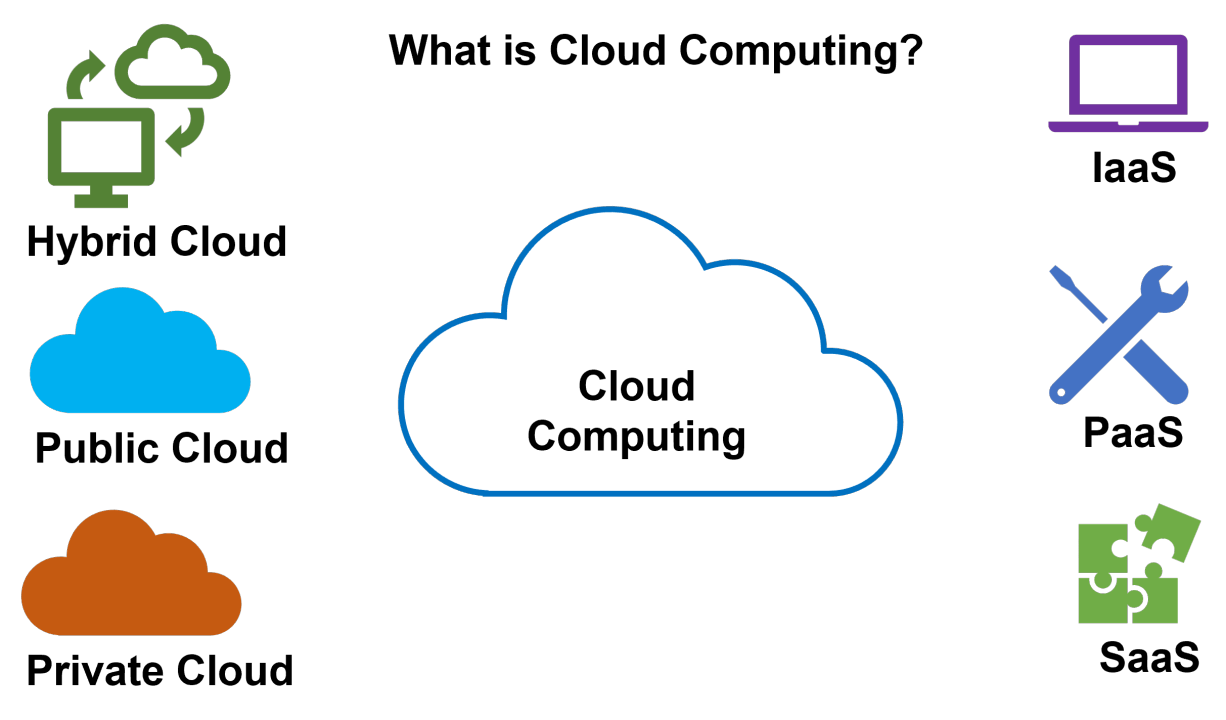
There are several different types of cloud computing, including public cloud, private cloud, and hybrid cloud. Each type offers different benefits and trade-offs, and organizations can choose the solution that best meets their needs.
Type of Cloud Computing
Cloud computing can be classified into three main types: public cloud, private cloud, and hybrid cloud.
Public cloud: Public cloud services are provided over the internet by third-party providers, such as Amazon Web Services (AWS), Microsoft Azure, or Google Cloud. Public clouds are owned and operated by the provider, and users access resources on a pay-per-use basis. Public clouds are generally the most cost-effective option for small to medium-sized businesses, as they do not require any upfront investment in hardware or infrastructure.
Private cloud: Private clouds are owned and operated by a single organization and are not shared with other users. Private clouds can be physically located on-premises or hosted by a third-party provider. Private clouds offer more control and security compared to public clouds, but they can be more expensive to set up and maintain.
Hybrid cloud: Hybrid clouds combine elements of both public and private clouds, allowing organizations to use the best solution for each workload. For example, an organization might use a public cloud for development and testing, while keeping critical applications and data on a private cloud for added security. Hybrid clouds can offer the benefits of both public and private clouds, but can also be more complex to manage.
Types of models for Cloud computing
There are several different types of models for cloud computing, which refer to the way in which users access and pay for cloud resources. These models include:
1. Infrastructure as a Service (IaaS): IaaS providers offer access to computing infrastructure, such as servers, storage, and networking, on a pay-per-use basis. Users are responsible for managing their own applications and operating systems.
2. Platform as a Service (PaaS): PaaS providers offer a platform for developing, testing, and deploying applications, including the underlying infrastructure and operating system. Users are responsible for building and managing their own applications, but do not have to worry about the underlying infrastructure.
3. Software as a Service (SaaS): SaaS providers offer access to a software application over the internet, typically on a subscription basis. Users do not have to worry about installing or maintaining the application or the underlying infrastructure, as everything is managed by the SaaS provider.
Recommended by LinkedIn
4. Function as a Service (FaaS): FaaS providers offer a platform for running code in response to events or triggers, such as an HTTP request or a message in a message queue. Users only pay for the resources consumed while their code is running, and do not have to worry about managing the underlying infrastructure.
5. Backup as a Service (BaaS): BaaS providers offer a service for backing up and restoring data to and from the cloud. Users can choose the type of data they want to back up and the frequency of backups, and the BaaS provider handles the rest.
Budget and Financial
CAPEX (capital expenditure) and OPEX (operational expenditure) are two types of expenses that are associated with the use of computing services.
CAPEX refers to expenses that are incurred when purchasing or building infrastructure, such as servers, storage, and networking equipment. These expenses are typically one-time costs that are incurred upfront, and they are generally considered to be investments in the business.
OPEX, on the other hand, refers to ongoing expenses that are associated with the operation and maintenance of infrastructure, such as power, cooling, and software licenses. These expenses are typically ongoing and recurring, and they are generally considered to be operating costs.
In the context of cloud computing, CAPEX and OPEX can refer to the expenses associated with building and maintaining an in-house, on-premises data center, as well as the expenses associated with using cloud services. Cloud services typically have a pay-as-you-go pricing model, which means you only pay for the resources you use, and you can scale up or down as needed. This can help to reduce upfront CAPEX costs and shift some of the expenses from CAPEX to OPEX.
Benefits of cloud computing
1. Pay for what you use: Instead of purchasing and maintaining your own hardware and software, cloud computing allows you to access resources on an as-needed basis, potentially lowering your upfront costs and allowing for more flexible pricing.
2. Elasticity: Cloud computing allows you to easily scale up or down your resources based on demand, giving you the ability to quickly respond to changes in workload.
3. Cost-effectiveness: By leveraging the economies of scale and shared infrastructure of a cloud provider, you may be able to achieve a lower overall cost than if you were to try to provide these resources on your own.
4. Improved speed and agility: Cloud computing can help you deploy new applications or services faster, as you don't have to worry about procuring and setting up the necessary infrastructure.
5. Global reach: Many cloud providers have a global network of data centers, allowing you to easily deliver your applications and services to users around the world with low latency.


