Canary Deployment Pattern
Article - Canary Deployment Pattern
Part 1: Defining the Canary Deployment Pattern
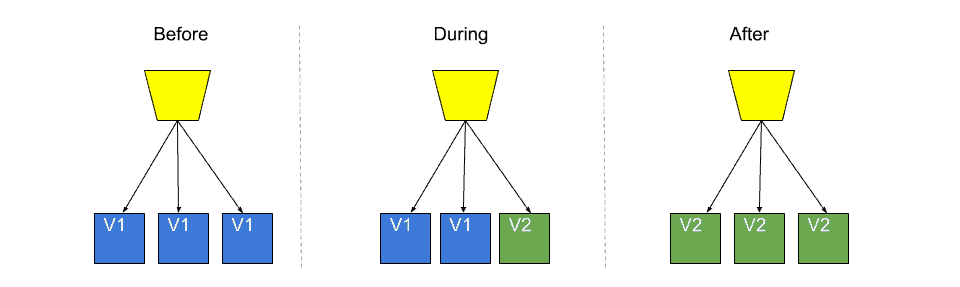
The Canary Deployment Pattern is a software development deployment strategy that involves releasing new features or updates to a small group of users before deploying them to the entire user base. This pattern allows developers to test new features or updates in a controlled environment before releasing them to all users. By doing so, developers can identify and fix any issues or bugs before they affect a larger audience.
The Canary Deployment Pattern is named after the practice of using canaries in coal mines to detect the presence of dangerous gases. Similarly, the small group of users who receive the new features or updates act as a canary, alerting the developers to any issues before they affect the larger user base.
Part 2: Use cases for the Canary Deployment Pattern
The Canary Deployment Pattern is particularly useful in situations where:
New features or updates have the potential to impact a large number of users or have critical functionality.
There is a risk of introducing bugs or other issues that could cause downtime or other problems.
The application or service has a large user base, making it difficult to test all scenarios in a staging or testing environment.
There are concerns about user adoption or satisfaction with the new features or updates.
Part 3: Improving the Canary Deployment Pattern
There are several ways to improve the Canary Deployment Pattern, including:
a) A/B testing: A/B testing involves releasing two or more versions of a feature or update to different groups of users and comparing the results. This can help developers determine which version is most effective and make improvements before releasing it to the entire user base.
b) Feature flags: Feature flags allow developers to toggle specific features on or off for different groups of users. This can be used to gradually roll out new features or updates to different user groups.
Recommended by LinkedIn
c) Automated testing: Automated testing can help developers detect and fix issues more quickly, reducing the risk of downtime or other problems.
Part 4: Using the Canary Deployment Pattern on AWS
Here's a step-by-step guide to using the Canary Deployment Pattern on AWS:
1. Use AWS CodeCommit to store your application or service code.
2. Create a new version of your application or service and deploy it to a small group of users.
3. Use Amazon CloudWatch to monitor the performance of the new version and detect any issues.
4. Use AWS CodeDeploy to automate the deployment process and gradually roll out the new version to additional user groups.
5. Use AWS Lambda to run automated tests and detect any issues before they affect users.
6. Use AWS Elastic Load Balancer to distribute traffic between different versions of your application or service.
7. Use AWS CloudFormation to manage the infrastructure and resources needed for the deployment.
By following these steps, you can gradually roll out new features or updates to your user base while minimizing the risk of downtime or other issues. Additionally, using the Canary Deployment Pattern on AWS provides benefits such as automatic scaling and increased availability.


Insightful post!! Canary Deployment Pattern is a clever way to avoid blowing up your software releases by testing them with a small group of users before unleashing them on the entire user base.