Building ReAct (Reason + Act) Agent Using Large Language Models
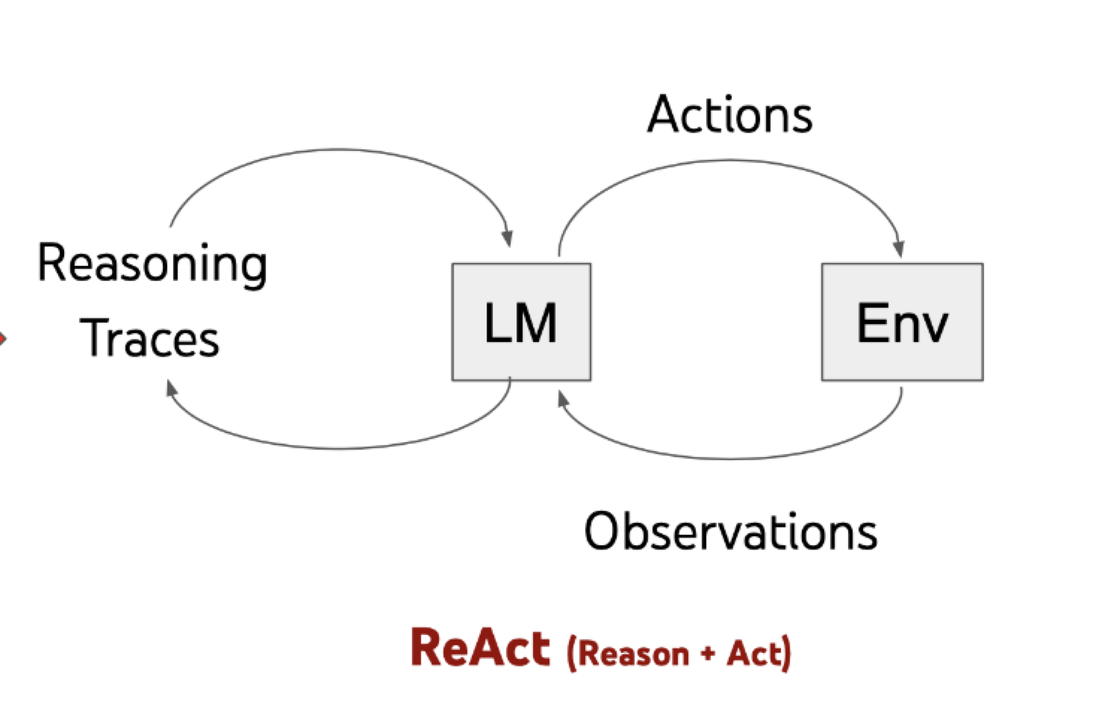
The ReACT (Reasoning and Action) agent model is a framework designed to merge the reasoning capabilities of large language models (LLMs) with the ability to perform actionable steps. This creates a more advanced system that can comprehend and process information, evaluate scenarios, execute appropriate actions, communicate responses, and monitor ongoing situations. In this article, we will walk through the process of creating a simple ReAct agent using Python, leveraging OpenAI's API.
We initialize OpenAI with the required API credentials, ensuring secure access to the service. Next, we configure the chat completion client by specifying the model ("gpt-3.5-turbo") and crafting the input message in a format that the model can process effectively.
import openai
import os
from openai import OpenAI

# Initialize OpenAI API client
client = OpenAI(api_key=OPENAI_API_KEY)

# Define the chat completion parameters
chat_completion = client.chat.completions.create(
    model="gpt-3.5-turbo",
    messages=[{"role": "user", "content": "Hello world"}]
)

# Print the generated response
print(chat_completion.choices[0].message.content)
Initialization:
Message Structure:
Generating a Response:
client.chat.completions.create method sends this message to the GPT-3.5 model and returns a response object, which is stored in the chat_completion variable.
2. Agent Class Implementation
class Agent:
    def __init__(self, system=""):
        self.system = system
        self.messages = []
        if self.system:
            self.messages.append({"role": "system", "content": system})

    def __call__(self, message):
        self.messages.append({"role": "user", "content": message})
        result = self.execute()
        self.messages.append({"role": "assistant", "content": result})
        return result

    def execute(self):
        completion = client.chat.completions.create(
                        model="gpt-4o",
                        temperature=0,
                        messages=self.messages)
        return completion.choices[0].message.content
Initialization (`__init__` method):
- self.system: Stores an optional system message that sets the agent's context or role.
- self.messages: List to store the conversation history.
- Adds the system message to self.messages if provided.
Handling User Messages (`__call__` method):
- message: Represents the user's input.
- Adds the user's message to self.messages with the role "user".
- Calls the execute method to generate a response.
- Adds the generated response to self.messages with the role "assistant".
- Returns the generated response.
- Executing the API Call (`execute` method):
- Calls client.chat.completions.create to generate a response from the model.
- Parameters:
- model="gpt-4o": Specifies the model to use.
- temperature=0: for deterministic responses.
- messages=self.messages: Passes the entire conversation history to the model.
- Returns the content of the generated response.
3. Prompt design for ReAct Agent
The provided prompt outlines the operational structure and behavior of a ReAct (Thought, Action, Observation, Result) agent designed to solve physics problems. It describes a cyclical process that the agent follows to answer queries by leveraging a set of predefined calculations. Here's a summary of the prompt and its application to a ReAct agent:
1. Operational Sequence:
- The agent follows a sequence of phases: Thought, Action, WAIT, and Evaluation. At the end of this sequence, the agent provides a final Result.
2. Phases Explained:
- Thought: The agent details its thoughts about the physics problem posed.
- Action: The agent performs one of the specified calculations based on its contemplation and returns WAIT.
- Evaluation: This phase presents the outcome of the executed calculation, received as feedback.
- Result: The agent delivers the final result based on the evaluation.
3. Specified Calculations:
- calculate_force: Calculates force using the formula F = m * a
- Example: calculate_force: mass=10, acceleration=2
- calculate_energy: Calculates potential energy using the formula PE = m g h
- Example: calculate_energy: mass=5, height=10
4. Example Interaction:
- Query: What is the force on a 10 kg object accelerating at 2 m/s²?
- Contemplation: The agent thinks about the problem and decides to calculate the force using F = m * a .
- Action: The agent executes calculate_force: mass=10, acceleration=2 and waits.
- The agent is prompted again with the evaluation.
- Evaluation: The force is 20 N.
- Result: The agent delivers the final result: The force on a 10 kg object accelerating at 2 m/s² is 20 N.
Recommended by LinkedIn
This setup ensures that the agent follows the structured sequence of Thought, Action, WAIT, and Evaluation, leading to clear and consistent responses based on predefined calculations.
4. Functions Overview
def calculate_force(mass, acceleration):
    print("force is {}".format(mass * acceleration))
    return mass * acceleration

def calculate_energy(mass, height, g=9.8):
    print("energy is {}".format(mass * g * height))
    return mass * g * height

def known_actions(action, params):
    if action == "calculate_force":
        return calculate_force(**params)
    elif action == "calculate_energy":
        return calculate_energy(**params)
    else:
        return "Unknown action"
The provided code defines functions that can be used by a ReAct agent to perform specific physics calculations. Here's how each part of the code fits into the ReAct agent framework:
1. calculate_force Function:
- Relevance to ReAct Agent: This function can be invoked by the agent when it needs to calculate the force based on user-provided mass and acceleration.
2. calculate_energy Function:
- Relevance to ReAct Agent: This function can be used by the agent to compute the potential energy based on user-provided mass and height.
3. known_actions Function:
- Purpose: Executes the appropriate calculation function based on the specified action.
- Parameters: action (the action to perform), params (a dictionary of parameters).
- Output: Calls calculate_force or calculate_energy with the appropriate parameters, or returns "Unknown action" if the action is not recognized.
- Relevance to ReAct Agent: This function directs the agent to perform the correct calculation based on the action specified in the user's query.
5. Testing the Agent
we test our agent by asking it to calculate the force on an object. This test demonstrates the agent's ability to handle a specific task based on user input.
abot = Agent(prompt)
result = abot("What is the force on a 10 kg object accelerating at 2 m/s²?")
print(result)

match = re.search(r'Action:\s*(\w+):\s*(.*)', result)
if match:
    action = match.group(1)
    param_str = match.group(2)
    params = dict(param.split("=") for param in param_str.split(", "))
    params = {key: float(value) for key, value in params.items()}
else:
    print( "Unknown action", {})

result = known_actions('calculate_force', {'mass': 10.0, 'acceleration': 2.0})
next_prompt = "Observation: {}".format(result)
abot(next_prompt)
Step-by-Step Process:
1. Initialization:
- The ReAct agent is initialized with a system prompt that sets the context for its operations.
2. System Prompt:
- Defines a sequence: Thought, Action, WAIT, and Evaluation.
- Specifies available actions: calculate_force and calculate_energy.
3. User Query:
- The user asks a physics-related question (e.g., "What is the force on a 10 kg object accelerating at 2 m/s²?").
4. Thought Phase:
- The agent reasons through the question to determine the necessary calculation.
5. Action Phase:
- The agent performs the relevant action using the known_actions function.
- known_actions directs the call to calculate_force or calculate_energy based on input parameters.
6. WAIT Phase:
- The agent pauses after performing the action, waiting for the calculation result.
7. Evaluation Phase:
- The agent receives and evaluates the outcome of the executed action.
8. Result:
- The agent provides the final answer to the user based on the evaluation.
Example Process
- Query: "What is the force on a 10 kg object accelerating at 2 m/s²?"
- Contemplation: "I need to calculate the force using the formula \( F = m \times a \)."
- Action: calculate_force: mass=10, acceleration=2
- WAIT: Agent waits for the result.
- Evaluation: "The force is 20 N."
- Result: "The force on a 10 kg object accelerating at 2 m/s² is 20 N."
Automating the process
Conclusion
The ReAct agent's structured approach, combining reinforcement learning with methodical, action-oriented processes, ensures accurate and contextually appropriate responses to user queries. By following a systematic cycle of Thought, Action, WAIT, and Evaluation, the agent effectively handles physics-related questions. ReAct framework demonstrates the potential for developing more intelligent and adaptive AI systems.


