Automated Data Augmentation for Deep Learning
Image data is the backbone of many deep learning applications, and for good reason. Images provide a wealth of visual information that can be used to train deep learning models for tasks like object detection, facial recognition, and image classification. However, building a high-quality image dataset for deep learning can be time-consuming and labor-intensive. This is where automated data augmentation comes in.
Data augmentation is the process of artificially expanding your training dataset by creating modified copies of your existing images. By applying various modifications to your images, you can create new training data that can help your deep learning models generalize better and reduce overfitting. Automated data augmentation takes this process a step further by using algorithms to generate new images automatically.
In this blog post, we will cover the steps involved in performing automated data augmentation for deep learning, including image flipping, random cropping, rotation, shearing, changing brightness, changing hue, and PCA color augmentation. We will use TensorFlow and TensorFlow Datasets to implement these steps.
Step 1: Load the Dataset
The first step in performing automated data augmentation is to load your image dataset. We will use TensorFlow Datasets to load the Stanford Dogs dataset, which contains images of dogs belonging to 120 different breeds.
import tensorflow as t
import tensorflow_datasets as tfds


# Load the Stanford Dogs dataset
doggies = tfds.load('stanford_dogs', split='train', as_supervised=True)
Step 2: Define the Augmentation Functions
The next step is to define the augmentation functions that will be used to create modified copies of the input images. We will define functions for flipping, random cropping, rotation, shearing, changing brightness, changing hue, and PCA color augmentation.
import tensorflow_probability as tf


def flip_image(image):
    # Flip the image horizontally
    return tf.image.flip_left_right(image)


def crop_image(image, size):
    # Randomly crop a portion of the image
    return tf.image.random_crop(image, size)


def rotate_image(image):
    # Rotate the image by 90 degrees counter-clockwise
    return tf.image.rot90(image)


def shear_image(image, intensity):
    # Randomly shear the image
    affine = tf.contrib.image.angles_to_projective_transforms(intensity * np.pi / 180, tf.shape(image)[-3], tf.shape(image)[-2])
    return tf.contrib.image.transform(image, affine)


def change_brightness(image, max_delta):
    # Randomly change the brightness of the image
    return tf.image.random_brightness(image, max_delta)


def change_hue(image, delta):
    # Change the hue of the image
    return tf.image.adjust_hue(image, delta)


def pca_color(image, alphas):
    # Perform PCA color augmentation
    orig_shape = tf.shape(image)
    image = tf.reshape(image, [-1, 3])
    mean = tf.reduce_mean(image, axis=0)
    centered = image - mean
    cov = tfp.stats.covariance(centered)
    eigvals, eigvecs = tf.linalg.eigh(cov)
    rnd = tf.random.normal([3], stddev=alphas)
    color_shift = tf.reduce_sum(tf.multiply(eigvecs, tf.reshape(rnd * eigvals, [1, 3])), axis=1)
    augmented = tf.add(image, color_shift)
    augmented = tf.reshape(augmented, orig_shape)
    augmented = tf.clip_by_value(augmented, 0, 255)
    return augmented
Step 3: Apply the Augmentations
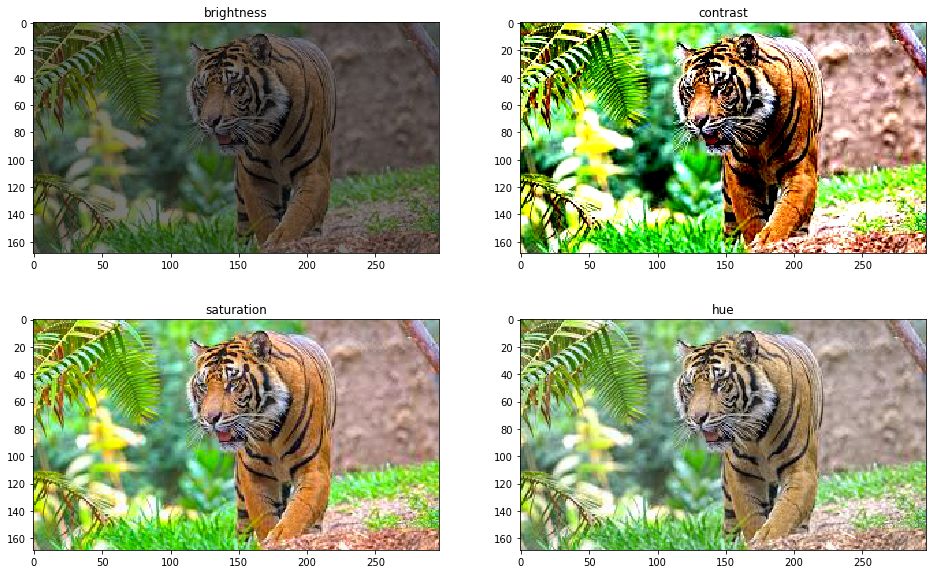
Brightness is an important feature of images, and it can also be altered to produce new images with different intensities. This technique can be helpful in many applications, like in self-driving cars, where the car needs to distinguish between various types of light and shadow. Changing brightness can also help in balancing the exposure of an image.
The brightness of an image can be changed by adding a scalar value to each pixel value. The scalar value can be determined by multiplying the maximum brightness by a random number between 0 and 1. The maximum brightness is set at 255, as this is the maximum pixel value for an 8-bit image.
Conclusion:
Data augmentation is a crucial technique in machine learning and computer vision, and it can help to create large datasets from small ones. Automated data augmentation can help to automate this process and can create a large variety of new images. These images can be used to train models that are more robust to different variations in the real world.
In this blog post, we have discussed some of the most commonly used data augmentation techniques, including flipping, cropping, rotation, shearing, brightness, hue, and PCA color augmentation. We have explained each technique step by step and provided examples to illustrate their use.
Thank you for reading this blog post. I hope you found it helpful in understanding automated data augmentation in machine learning and computer vision.
Hi Sofia, I met you at the graduations presentation. Please send me Contact info to me Salvador Vassallo