Async Controller Methods For Scalability
In API action methods, it is very common to call a database or another web resource to get requested data. Getting data from another server takes time and it is generally at least order of magnitude slower than all other processing code in the action method. If the data fetching calls are done synchronously then most of the time the request processing thread is doing nothing but waiting for data.
Let's say we have a .NET API server with 100 threads in the thread pool ready for serving requests. If we assume each request takes 200ms on average to complete, it can handle 500 request/s. But as we know most of the time threads are idle just waiting for data so potentially we should able to handle a much higher traffic with the same server. The following shows what happens when synchronous calls are used in action methods to access data. Threads are blocked and dedicated for a request. The server is wasting its computing power most of the time for nothing.
Code example of a Synchronous action method.
[HttpGet]
[Produces("application/json")]
[ProducesResponseType(StatusCodes.Status200OK)]
[ProducesResponseType(StatusCodes.Status500InternalServerError)]
public IEnumerable<Product> GetProducts()
{
	var products = dataService.GetProducts();
	if(products is null)
	 {
	    Response.StatusCode = StatusCodes.Status500InternalServerError;
	 }
	return products;
}
Async and Await
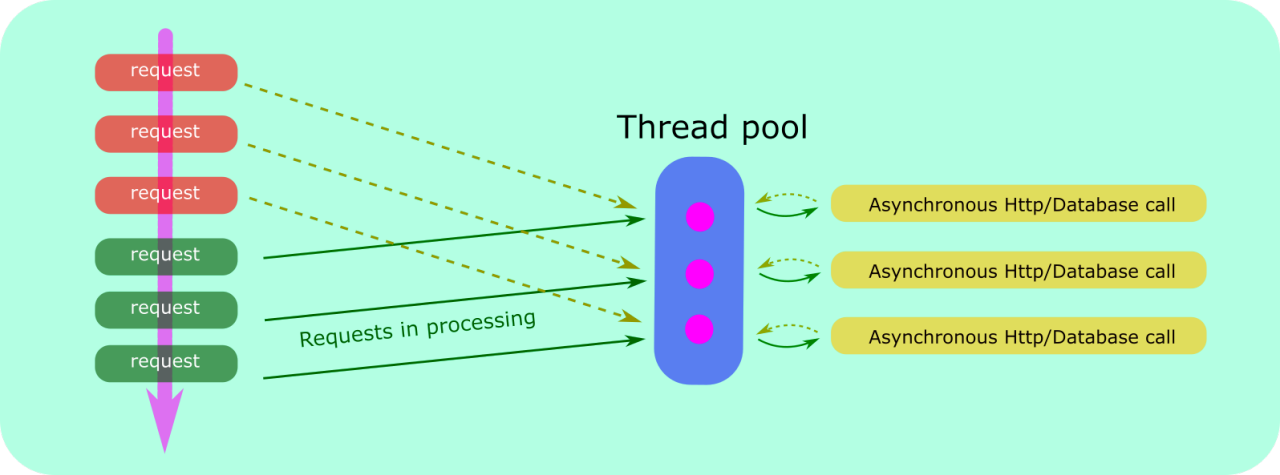
The Async and Await key words in .NET core make it quite easy to manage async calls. Generally whenever we are doing calls with I/O we should use async methods. In the following example, the thread will be returned to the Thread pool and ready for the next request when GetProductAsync() is executed. The runtime will get a thread (may or may not be the same one) from Thread pool to continue the action method execution when the data is returned from GetProductAsync().
[HttpGet]
[Produces("application/json")]
[ProducesResponseType(StatusCodes.Status200OK)]
[ProducesResponseType(StatusCodes.Status500InternalServerError)]
public async Task<IEnumerable<Product>> GetProducts()
{
	var products = await dataService.GetProductsAsync();
	if(products is null)
	 {
	    Response.StatusCode = StatusCodes.Status500InternalServerError;
	 }
	return products;
}
If the action method spends 95% of time waiting for data to arrive over the wire then we can easily see the server can now serves traffic at a rate of 20 times higher. This is a big win for scalability without even adding a new server.