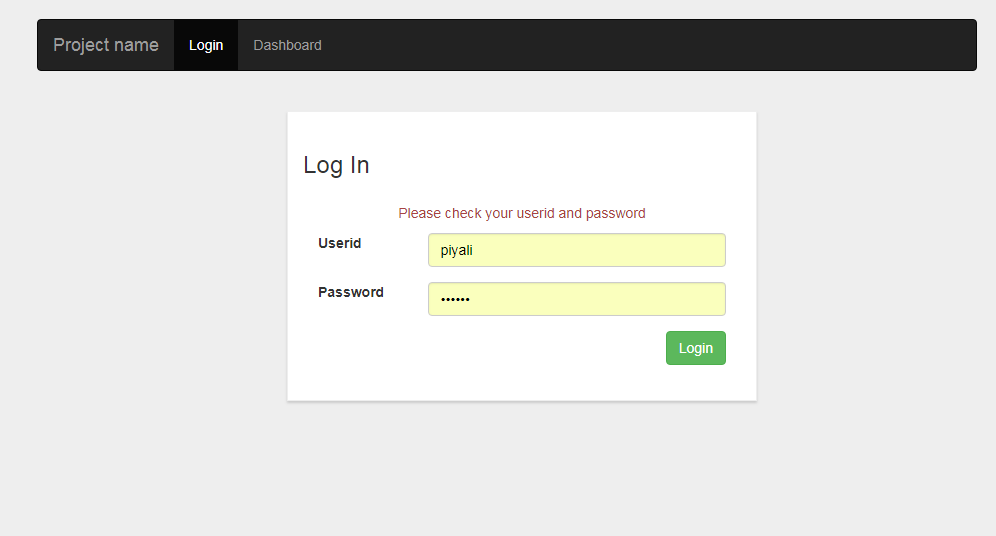
Angular 6 login with Session Authentication & Reactive Form Validation
ng new project
ng g component login
ng g component dashboard
ng g service auth
ng g interface login
ng g guard auth
login.ts (interface)
export class ILogin {
    userid: string;
    password: string;
}
app.module.ts
import AuthGuard and router module in app.module.ts. configure routes using const appRoutes and import appRoutes using RouterModule.forRoot(appRoutes). forRoot creates a module that contains all the directives, the given routes, and the router service itself. canActivate : [AuthGuard] is useful when we want to check something before a component gets used : checking if an user is authenticated. That's why i have declared in dashboard route section. After checking user , we will give permission to enter dashboard.
import { BrowserModule } from '@angular/platform-browser';
import { NgModule } from '@angular/core';
import { RouterModule, Routes } from '@angular/router';
import { AuthGuard } from './auth.guard';
import { FormsModule, ReactiveFormsModule } from '@angular/forms';

import { AppComponent } from './app.component';
import { LoginComponent } from './login/login.component';
import { DashboardComponent } from './dashboard/dashboard.component';


const appRoutes: Routes = [
  { path: 'login', component: LoginComponent },
  { path: 'dashboard', component: DashboardComponent, canActivate: [AuthGuard] }
];

@NgModule({
  declarations: [
    AppComponent,
    LoginComponent,
    DashboardComponent
  ],
  imports: [
    BrowserModule,
    FormsModule,
    ReactiveFormsModule,
    RouterModule.forRoot(appRoutes)
  ],
  providers: [AuthGuard],
  bootstrap: [AppComponent]
})
export class AppModule { }
app.component.html
routerlink="/login" sets the url. routerLinkActive adds class active which menu is selected. The <router-outlet> tells the router where to display routed views.
<!--The content below is only a placeholder and can be replaced.-->
<div class="container">

  <!-- Static navbar -->
  <nav class="navbar navbar-inverse">
      <div class="container-fluid">
        <div class="navbar-header">
          <button type="button" class="navbar-toggle collapsed" data-toggle="collapse" data-target="#navbar" aria-expanded="false" aria-controls="navbar">
            <span class="sr-only">Toggle navigation</span>
            <span class="icon-bar"></span>
            <span class="icon-bar"></span>
            <span class="icon-bar"></span>
          </button>
          <a class="navbar-brand" href="#">Project name</a>
        </div>
        <div id="navbar" class="navbar-collapse collapse">
          <ul class="nav navbar-nav">
            <li routerLinkActive="active"><a routerLink="/login">Login</a></li>
            <li routerLinkActive="active"><a routerLink="/dashboard">Dashboard</a></li>
          </ul>
        </div><!--/.nav-collapse -->
      </div><!--/.container-fluid -->
    </nav>

 <router-outlet></router-outlet>
</div>
login.component.html
Reactive form is being used for validation using [formGroup].
<div class="container">
    <div class="col-md-6 col-md-offset-3 loginBox">
        <h3>Log In</h3>
        <p *ngIf="message" class="text-center error">{{message}}</p>
      <form [formGroup]="loginForm" (ngSubmit)="login()">
          <div class="form-group clearfix" [ngClass]="{ 'has-error': submitted && f.userid.errors }">
              <label for="userid" class="col-md-3 col-sm-5 col-xs-12">Userid</label>
              <div class="col-md-9 col-sm-7 col-xs-12">
                  <input type="text" class="form-control" formControlName="userid" />
                  <div *ngIf="submitted && f.userid.errors" class="help-block">
                        <div *ngIf="f.userid.errors.required">Userid is required</div>
                  </div>
              </div>
          </div>
          <div class="form-group clearfix" [ngClass]="{ 'has-error': submitted && f.password.errors }">
            <label for="password" class="col-md-3 col-sm-5 col-xs-12">Password</label>
            <div class="col-md-9 col-sm-7 col-xs-12">
                <input type="password" class="form-control" formControlName="password"/>
                <div *ngIf="submitted && f.password.errors" class="help-block">
                        <div *ngIf="f.password.errors.required">Password is required</div>
                </div>
            </div>
          </div>
          <div class="col-xs-12 form-group text-right">
            <button class="btn btn-success" type="submit">Login</button>
          </div>
      </form>
    </div>
</div>
login.component.ts
formBuilder is used for reactive form and have to initialized in ngOnInit() function for validation. login() function is written in this component. this.f.userid.value is used for userid filed data after submitting login form and check the value with this.model.userid (admin). If both userid and password are match of model with the form fields then isLoggedIn variable will be true, create session of token with userid and navigate to the url "/dashboard".
import { Component, OnInit } from '@angular/core';
import { FormBuilder, FormGroup, Validators } from '@angular/forms';
import { Router } from '@angular/router';
import { ILogin } from '../login';
import { AuthService } from '../auth.service';

@Component({
  selector: 'app-login',
  templateUrl: './login.component.html',
  styleUrls: ['./login.component.css']
})
export class LoginComponent implements OnInit {

  model: ILogin = { userid: "admin", password: "admin123" };
  loginForm: FormGroup;
  message: string;
  returnUrl: string;

  constructor(private formBuilder: FormBuilder,private router: Router, public authService: AuthService) { }

  ngOnInit() {
    this.loginForm = this.formBuilder.group({
      userid: ['', Validators.required],
      password: ['', Validators.required]
    });
    this.returnUrl = '/dashboard';
    this.authService.logout();
  }

  // convenience getter for easy access to form fields
  get f() { return this.loginForm.controls; }


  login() {

    // stop here if form is invalid
    if (this.loginForm.invalid) {
        return;
    }
    else{
      if(this.f.userid.value == this.model.userid && this.f.password.value == this.model.password){
        console.log("Login successful");
        //this.authService.authLogin(this.model);
        localStorage.setItem('isLoggedIn', "true");
        localStorage.setItem('token', this.f.userid.value);
        this.router.navigate([this.returnUrl]);
      }
      else{
        this.message = "Please check your userid and password";
      }
    }
}

}
dashboard.component.html
<div class="container">
    <div class="col-md-6 col-md-offset-3 loginBox">
        Welcome,  {{id}}
        <a href="javascript:void(0);" (click)="logout()">Logout</a>
    </div>
</div>
dashboard.component.ts
get the value of token using localStorage.getItem and store it in "id" variable. Call authService.logout() function using logout function of dashboard cimponent.
import { Component, OnInit } from '@angular/core';
import { AuthService } from '../auth.service';
import { Router } from '@angular/router';

@Component({
  selector: 'app-dashboard',
  templateUrl: './dashboard.component.html',
  styleUrls: ['./dashboard.component.css']
})
export class DashboardComponent implements OnInit {

  id: string;
  constructor(private router: Router,public authService: AuthService) { }

  ngOnInit() {
    this.id = localStorage.getItem('token');
  }

  logout(): void {
    console.log("Logout");
    this.authService.logout();
    this.router.navigate(['/login']);
  }

}
auth.service.ts
import { Injectable } from '@angular/core';
import { ILogin } from './login';

@Injectable({
  providedIn: 'root'
})
export class AuthService {

  constructor() { }

  logout(): void {
    localStorage.setItem('isLoggedIn', "false");
    localStorage.removeItem('token');
  }

}
auth.guard.ts
import { Injectable } from '@angular/core';
import { CanActivate, CanActivateChild, Router, ActivatedRouteSnapshot, RouterStateSnapshot } from '@angular/router';

@Injectable()
export class AuthGuard implements CanActivate {


    constructor(private router : Router){}

    canActivate(route: ActivatedRouteSnapshot, state: RouterStateSnapshot): boolean {
        let url: string = state.url;
        return this.verifyLogin(url);
    }

    verifyLogin(url) : boolean{
        if(!this.isLoggedIn()){
            this.router.navigate(['/login']);
            return false;
        }
        else if(this.isLoggedIn()){
            return true;
        }
    }
    public isLoggedIn(): boolean{
        let status = false;
        if( localStorage.getItem('isLoggedIn') == "true"){
          status = true;
        }
        else{
          status = false;
        }
        return status;
    }
}
Download code : https://github.com/piyalidas10/login-Authentication-Reactive-Form
Great post!
can you tell me if there is any specific reason that your created Login as class and created it as an Interface?
thanks
Thanx for the post! And what will happen on session timeout on the server side? Frontend will still have "isLoggedIn() == true", right?
tanx for awsome code please help me to this error 'src/app/dashboard/dashboard.component.ts(21,22): error TS2339: Property 'logout' does not exist on type 'AuthService'.'